
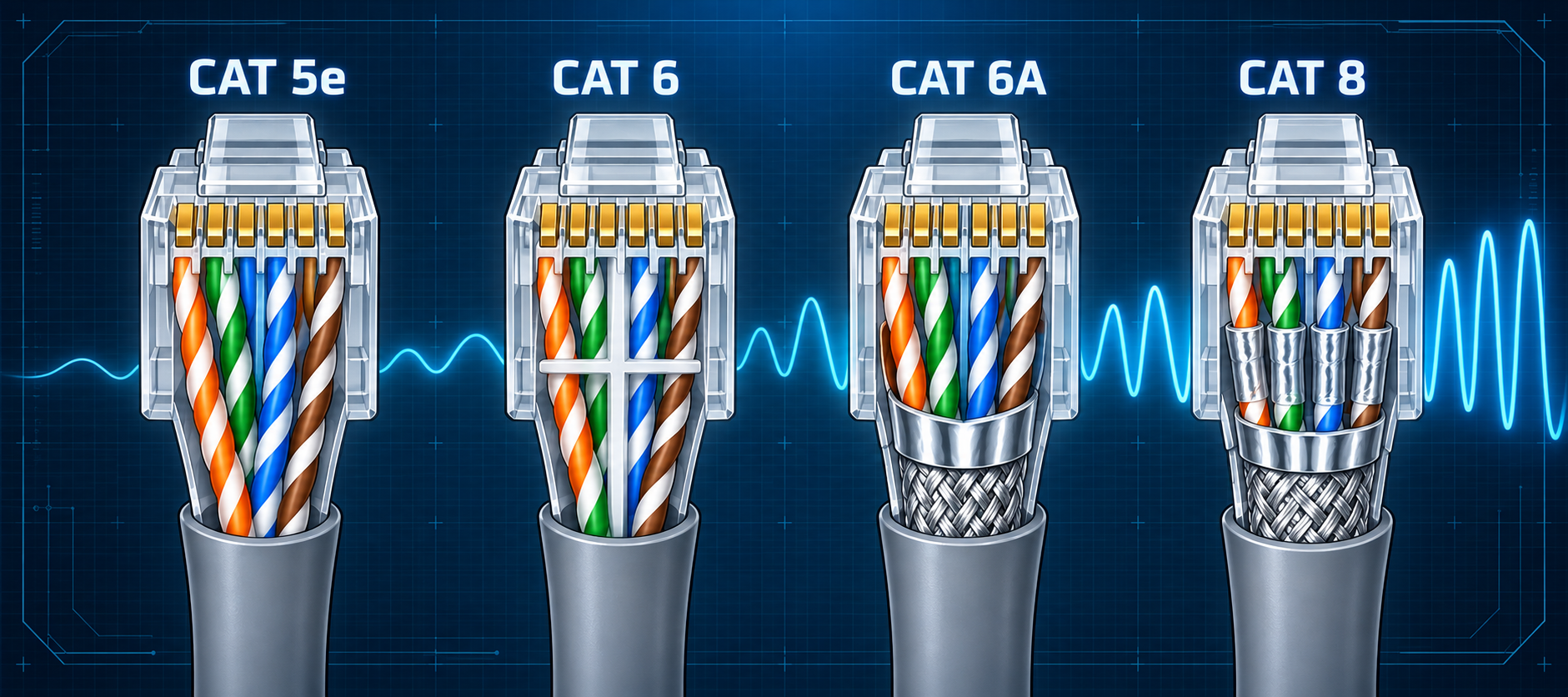
Ethernet cable categories: Cat 5 through Cat 8
Compare Cat 5, 5e, 6, 6A, 7, 7A, and 8 by frequency, speed, reach, shielding, connector, and TIA versus ISO/IEC scope.
Written and technically reviewed byElectroDesignForge Engineering Team
View the editorial processKey point: a cable category specifies transmission performance, not a guaranteed Ethernet speed by itself. The installed channel is limited by its weakest cable, connector, patch cord, termination, and installation detail. Cat 6A is the usual 100 m choice for 10GBASE-T; Cat 8 targets short 25/40GBASE-T data-centre links.
Category, channel, and Ethernet application
The category printed on a cable describes component performance over a frequency range. Ethernet standards then define which cabling performance and channel length a particular BASE-T PHY needs.
Three terms must not be mixed:
- Cable category: performance of the bulk cable itself.
- Component category: performance of jacks, plugs, patch panels, and cords.
- Channel or permanent-link class: end-to-end performance after installation.
Installing Cat 6A cable with Cat 5e jacks does not create a Cat 6A channel. Poor termination, excessive untwist, tight bends, crushing, water, or incompatible shield bonding can also reduce the achieved class.
Practical comparison
| Category | Rated frequency | Typical BASE-T use and reach | Position today |
|---|---|---|---|
| Cat 5 | 100 MHz | Legacy 100BASE-TX to 100 m; 1000BASE-T only if the installed channel passes the required tests | Withdrawn for new TIA installations; do not specify for new work |
| Cat 5e | 100 MHz | 1000BASE-T to 100 m; also supports 2.5GBASE-T on compliant channels | Common existing access cabling |
| Cat 6 | 250 MHz | 1000BASE-T to 100 m; 10GBASE-T to 37 m normally, or up to 55 m only after alien-crosstalk qualification and testing | Useful for 1G and qualified shorter multi-gigabit links |
| Cat 6A | 500 MHz | 10GBASE-T to 100 m | Preferred general-purpose category for new 10G copper links |
| Cat 7 / Class F | 600 MHz | 10GBASE-T to 100 m on a compliant ISO channel | ISO/IEC system; not a recognized ANSI/TIA category |
| Cat 7A / Class FA | 1,000 MHz | 10GBASE-T to 100 m with additional frequency headroom | ISO/IEC system; not a recognized ANSI/TIA category |
| Cat 8 | 2,000 MHz | 25GBASE-T and 40GBASE-T over a channel up to 30 m | Shielded, short-reach data-centre cabling |
These are design guideposts, not permission to ignore the application standard. Check the Ethernet PHY, building cabling standard, topology, ambient temperature, patch-cord allowance, and manufacturer limits for the actual project.
Cat 5 and Cat 5e
Original Cat 5 is a legacy category. It was designed around 100 MHz performance and is no longer the normal basis for a new standards-compliant installation. A surviving Cat 5 link may carry Gigabit Ethernet when it passes all required 1000BASE-T channel parameters, but its label alone is not proof.
Cat 5e added tighter requirements, including parameters needed for reliable four-pair Gigabit Ethernet. It remains suitable for 1000BASE-T channels up to 100 m and is a defined medium for 2.5GBASE-T. Existing Cat 5e can therefore remain useful, but field testing is prudent before a multi-gigabit upgrade, especially where bundles, old patch panels, or PoE heating are present.
Cat 6 and Cat 6A
Cat 6 raises the component bandwidth to 250 MHz and improves crosstalk margin. It supports 1000BASE-T to the normal 100 m channel length. For 10GBASE-T, use 37 m as the normal unqualified limit. A Cat 6 channel may extend to 55 m only after the installed cabling has been qualified and tested for alien-crosstalk performance; bundle density, neighbouring cables, patching, and the installation environment all affect that result.
Cat 6A extends characterized performance to 500 MHz and controls alien crosstalk for 10GBASE-T over the full 100 m channel. For new office, industrial, Wi-Fi access-point, camera, and building-services cabling where 10G or higher-power PoE may be expected, Cat 6A is often the most practical long-lived choice.
A means augmented, not merely “shielded.” Cat 6A exists in unshielded and shielded constructions. Shielding can improve noise control, but only when connectors, bonding, grounding, and installation practice form a complete system.
Cat 7 and Cat 7A: ISO, not TIA categories
Cat 7 and Cat 7A belong to the ISO/IEC cabling family, associated with channel Classes F and FA. ANSI/TIA-568.2-E recognizes Cat 5e, Cat 6, Cat 6A, and Cat 8; it does not define Cat 7 or Cat 7A.
Class F and FA systems are shielded and may use connector interfaces other than the familiar 8P8C modular interface. A retail product marked “Cat 7 RJ45” does not automatically form a standards-compliant Class F channel. Verify the cited standard, connector interface, component certification, and channel test limits instead of relying on the marketing label.
Cat 8: high speed over a short channel
Cat 8 is characterized to 2 GHz for short data-centre links. IEEE 25GBASE-T and 40GBASE-T target a channel no longer than 30 m, commonly arranged as up to 24 m of permanent link plus patch cords within the channel allowance.
Under ISO/IEC, Category 8.1 / Class I retains compatibility with the Cat 6A-style modular connector family, while Category 8.2 / Class II belongs to the Class F/FA connector family. ANSI/TIA defines its own Category 8 channel requirements. Do not treat all products carrying “Cat 8” as interchangeable without checking the standards system and connector type.
Cat 8 is not a general 100 m replacement for Cat 6A. Its value is high speed across short equipment rows or end-of-row links where copper is specifically required.
There is no standardized Cat 9
As of the cited ANSI/TIA and ISO/IEC structured-cabling standards, Cat 9 and Cat 10 are not standardized balanced-cabling categories. Labels such as “Cat 9,” extreme frequency claims, or bandwidth stated only in Gbit/s are marketing claims unless they point to a recognized standard and independent component or channel certification.
For a purchase or specification, require:
- The exact standard and edition.
- Category certification for cable and connecting hardware.
- Channel or permanent-link test reports with calibrated equipment.
- Fire, smoke, environmental, and installation ratings required by the site.
Category does not equal speed
A 500 MHz cable does not transmit “500 Mbit/s,” and a 2,000 MHz cable does not by itself create a 40 Gbit/s link. Ethernet PHYs use multilevel signalling, echo cancellation, equalization, and all four pairs to carry a data rate that differs from the cable test frequency.
The Ethernet BASE-T speeds guide gives the pair count, nominal data rate, cabling target, and reach for common copper PHYs.
PoE, conductor material, and temperature
PoE current creates heat proportional to conductor resistance. Category is only one part of a safe powered channel.
- Prefer standards-compliant solid copper conductors for permanent links. Copper-clad aluminium (CCA) has higher resistance and is not a substitute for compliant balanced copper cabling.
- Check conductor gauge, DC loop resistance, resistance unbalance, bundle size, ambient temperature, insulation rating, and connector current performance.
- Higher temperature increases insertion loss, which can reduce available reach. Large PoE bundles may require cable derating or a different installation layout.
- Four-pair PoE needs all eight contacts correctly terminated. Inspect plugs and jacks for damage or contamination.
- A shield does not carry normal PoE current and does not correct undersized conductors.
See the Power over Ethernet guide and Ethernet PoE pinout for power classes, pair use, and installation checks.
Selection guide
| Need | Sensible starting point |
|---|---|
| Maintain an existing 1G network | Test and retain compliant Cat 5e or better |
| New 1G access link with future margin | Cat 6 or, preferably where budget permits, Cat 6A |
| 10G to 100 m | Cat 6A |
| 10G on existing Cat 6 | Use 37 m normally; consider up to 55 m only after alien-crosstalk qualification and testing |
| 25/40G copper within 30 m | Cat 8 with the exact supported channel design |
| Longer high-speed backbone | Compare fibre rather than escalating to an unrecognized category |
The straight-through and crossover cable guide explains termination choices. The RJ45 T568A and T568B pinout gives the conductor order.
Sources
- ANSI/TIA-568.2-E — Balanced Twisted-Pair Telecommunications Cabling and Components Standard — Category 5e, 6, 6A, and 8 component and cabling requirements.
- ISO/IEC 11801-1:2017 and amendments — Generic cabling for customer premises, Part 1: General requirements — Categories 5 through 8.2 and channel Classes D through II.
- IEEE Std 802.3-2022 — IEEE Standard for Ethernet — BASE-T physical layers and link-segment requirements.
- IEEE Std 802.3an-2006 — 10GBASE-T — 10 Gbit/s operation over balanced twisted-pair cabling.
- IEEE Std 802.3bz-2016 — 2.5GBASE-T and 5GBASE-T — 2.5 and 5 Gbit/s operation over balanced twisted-pair media.
- IEEE Std 802.3bq-2016 — 25GBASE-T and 40GBASE-T — 25 and 40 Gbit/s operation over channels up to 30 m.
- TIA TSB-155-A — Guidelines for the Assessment and Mitigation of Installed Category 6 Cabling to Support 10GBASE-T — assessment and alien-crosstalk qualification of existing Cat 6 links beyond the normal 37 m limit.
- TIA TSB-184-A — Guidelines for Supporting Power Delivery Over Balanced Twisted-Pair Cabling — bundle heating, resistance, and installation guidance for remote power.