Copper Ethernet speeds: 10BASE-T through 40GBASE-T
Compare 10BASE-T, 100BASE-TX, 1000BASE-T, 2.5G, 5G, 10G, 25G, and 40GBASE-T by pairs, category, reach, and negotiation.
Written and technically reviewed byElectroDesignForge Engineering Team
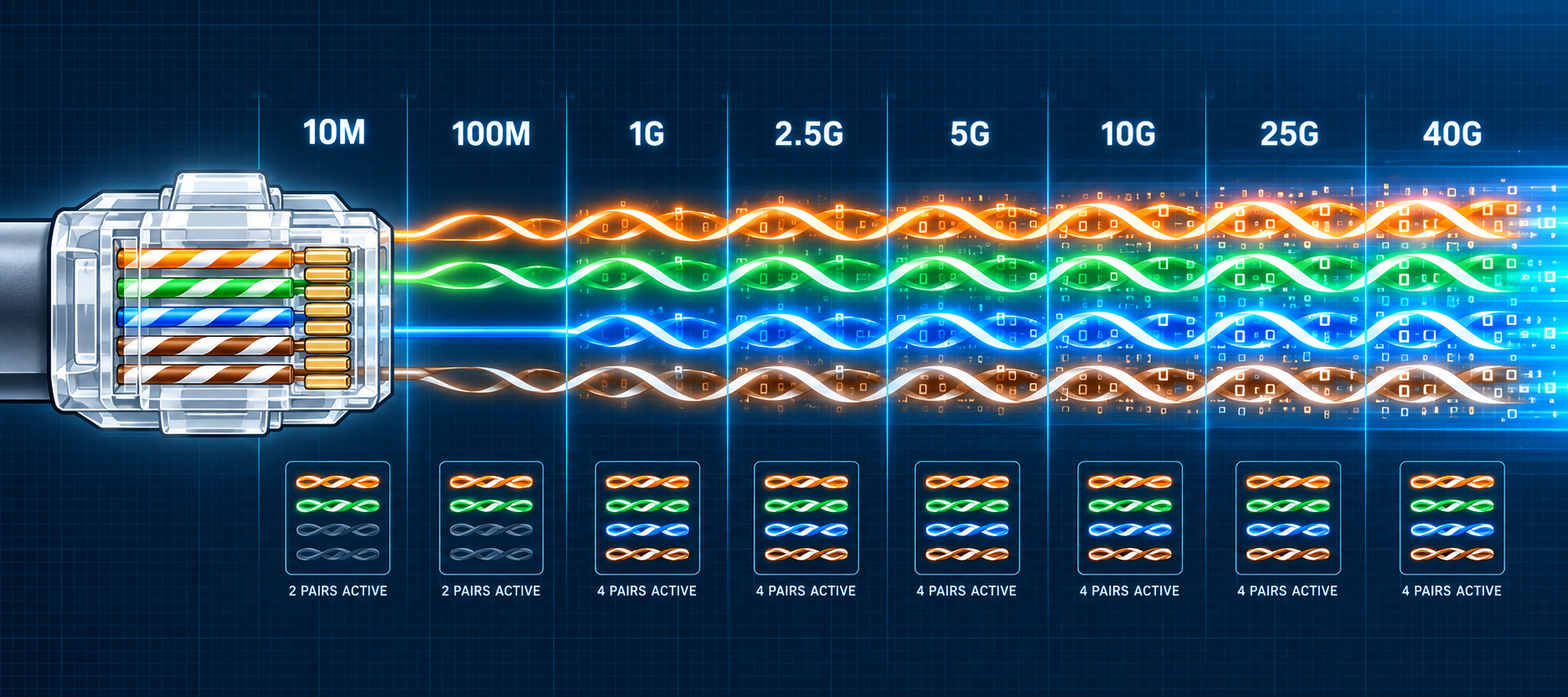
View the editorial processKey point: the 8P8C connector and T568 wiring stay the same as link speed changes, but the PHY does not always use the pairs in the same way. 10BASE-T and 100BASE-TX use two pairs; 1000BASE-T and faster variants use all four pairs bidirectionally. Reach then depends on the cable category and the measured quality of the complete channel.
Quick reference
| Ethernet PHY | Nominal rate | Data pairs | Reference cabling | Common channel reach |
|---|---|---|---|---|
| 10BASE-T | 10 Mb/s | 2 | Cat 3 or better | 100 m |
| 100BASE-TX | 100 Mb/s | 2 | Cat 5 or better | 100 m |
| 1000BASE-T | 1 Gb/s | 4 | Cat 5e or better | 100 m |
| 2.5GBASE-T | 2.5 Gb/s | 4 | Cat 5e or better | 100 m |
| 5GBASE-T | 5 Gb/s | 4 | Cat 6 or better | 100 m |
| 10GBASE-T | 10 Gb/s | 4 | Cat 6A or better | 100 m |
| 25GBASE-T | 25 Gb/s | 4 | Cat 8 / Class I or II | 30 m |
| 40GBASE-T | 40 Gb/s | 4 | Cat 8 / Class I or II | 30 m |
These values summarise the reference configurations. A qualified Cat 5e channel can support 5GBASE-T in defined deployments. A Cat 6 channel may carry 10GBASE-T over reduced distance, but it does not replace a 100 m Cat 6A guarantee.
Reading BASE-T names
The number indicates nominal line rate: 10, 100, 1000, 2.5G, 5G, or 10G. BASE means baseband signalling and T means twisted pair. 100BASE-TX is the familiar two-pair Fast Ethernet PHY; do not confuse it with the obsolete four-pair 100BASE-T4 PHY.
The advertised rate is the physical link rate before preambles, Ethernet headers, network protocols, and any retransmissions. A 1 Gb/s link therefore does not deliver a full 1 Gbit/s of application payload. In full duplex it can carry 1 Gb/s in each direction at once, but its nominal speed remains 1 Gb/s rather than 2 Gb/s.
Pins and pairs by link speed
The connector’s four pairs always occupy the same pin groups:
| Logical pair | Pins | Historical 10BASE-T / 100BASE-TX MDI function | 1000BASE-T and faster |
|---|---|---|---|
| A | 1–2 | transmit TX+ / TX− | bidirectional |
| B | 3–6 | receive RX+ / RX− | bidirectional |
| C | 4–5 | unused for data | bidirectional |
| D | 7–8 | unused for data | bidirectional |
A historical MDI-X port, such as a hub or switch port, reverses transmit and receive on pairs A and B. Auto-MDI-X on modern equipment detects the orientation and corrects it automatically.
From 1000BASE-T upward, each pair transmits and receives simultaneously through PHY signal processing and echo cancellation. Fixed TX and RX labels are therefore inappropriate; datasheets commonly use BI_DA, BI_DB, BI_DC, and BI_DD instead.
T568A and T568B do not change this electrical function. They only swap the orange and green colours assigned to pins 1–2 and 3–6. See the RJ45 T568A/T568B pinout before building or checking a cord.
10BASE-T and 100BASE-TX: two pairs
These PHYs use the pairs on pins 1–2 and 3–6. On a traditional MDI port, the first pair transmits and the second receives; an MDI-X port does the reverse. This is the origin of straight-through cables between unlike port types and crossover cables between like port types.
All four pairs should still be preserved in a modern installation. They are required for Gigabit, multigigabit, and some PoE powering methods. A link that unexpectedly negotiates 100 Mb/s instead of 1 Gb/s often has an open pair, poor termination, or a cable containing only two pairs.
The straight-through and crossover Ethernet cables page gives the pin mappings and explains auto-MDI-X.
1000BASE-T: four pairs at 1 Gb/s
1000BASE-T distributes its coding across all four pairs, each operating in both directions simultaneously. It is designed for a 100 Ω balanced channel up to 100 m. Cat 5e is the modern reference. Some legacy Cat 5 channels can work if they meet the additional 1000BASE-T parameters, but that must be measured and does not justify a new Cat 5 installation.
Auto-negotiation also exchanges information needed for Gigabit operation. Avoid arbitrarily forcing speed and duplex to hide a cabling fault: test wiremap, length, loss, and crosstalk first.
2.5GBASE-T and 5GBASE-T: reusing installed cabling
IEEE 802.3bz added intermediate rates while retaining four-pair operation and reach up to 100 m:
- 2.5GBASE-T targets Cat 5e channels, among others;
- 5GBASE-T targets Cat 6 channels and can operate on some Cat 5e channels qualified for the additional parameters.
The category printed on a cable jacket is not enough to qualify an installed channel. Connectors, patch cords, neighbouring bundles, installation damage, and external interference are part of the channel. With insufficient margin, the PHY may negotiate a lower rate or experience errors and link resets.
10GBASE-T: Cat 6A for 100 m
Cat 6A is the straightforward reference for carrying 10GBASE-T over a 100 m channel. A Cat 6 channel can operate over reduced distance, but alien crosstalk from neighbouring cables becomes critical:
- operation is generally expected up to about 37 m on a compliant channel;
- between 37 and 55 m, support depends on the alien-crosstalk environment and requires qualification;
- beyond that, mitigation or replacement with Cat 6A is normally required.
A continuity test or a test stopping at 100 MHz does not qualify 10GBASE-T. Certification must cover the required frequency-domain parameters and, for Cat 6, relevant alien-crosstalk tests.
25GBASE-T and 40GBASE-T: short-reach Cat 8
IEEE 802.3bq defines 25GBASE-T and 40GBASE-T over balanced channels up to 30 m. These PHYs use all four pairs and Cat 8 / Class I or Class II cabling characterised to 2 GHz. They mainly target short data-centre links; optical modules and DAC assemblies are much more common at these rates.
The 30 m figure describes the Cat 8 application for 25/40GBASE-T. Do not copy that limit to 10GBASE-T or slower rows without considering their own channel standard.
Choosing cable without confusing MHz and Mb/s
A category’s upper frequency characterises the medium; it is not its bit rate. Coding, signal processing, crosstalk, and reach together determine the supported PHY. Two cables advertised at 500 MHz are not necessarily equivalent if one is not certified as a Cat 6A component.
For a practical decision:
- Set the data rate, total length, and any PoE power requirement.
- Select the category that guarantees the rate at that reach, with suitable upgrade margin.
- Count the complete channel: permanent link, outlets, patch panels, and equipment cords.
- Use consistently rated components and certify the finished installation.
- For new 10G at 100 m or high-power PoE, Cat 6A is usually the balanced choice; Cat 8 serves the distinct 25/40G-at-30-m use case.
The Ethernet cable categories from Cat 5 to Cat 8 page compares frequency, shielding, connectivity, and applications in more detail.
Auto-negotiation and achieved rate
The two ports advertise capabilities and select their best common mode. If the negotiated rate is lower than expected, check in this order:
- actual capabilities of both ports and any intermediate modules;
- auto-negotiation settings and drivers;
- presence and continuity of all four pairs;
- category and length of every equipment cord;
- channel certification and error counters;
- interference, damaged connectors, and excessive bends.
| Observation | Likely interpretation |
|---|---|
| 1 Gb/s falls back to 100 Mb/s | at least one of the four pairs is missing or faulty |
| 10G works on a short cord but not the installed channel | channel loss, crosstalk, or category is inadequate |
| 2.5G works but 5G falls back | insufficient Cat 5e margin for 5G or a 2.5G-only port |
| Link rate is correct but transfers are slower | protocol overhead, storage, CPU, Wi-Fi, or congestion rather than the PHY |
| Link becomes unstable under PoE load | resistance, heating, and power budget need checking alongside data parameters |
Related pages
- Ethernet RJ45 — T568A and T568B pinout — colours and functions of all eight pins.
- Ethernet PoE pinout — power pairsets on the same connector.
- Straight-through and crossover Ethernet cables — 1:1 wiring, crossovers, and auto-MDI-X.
- Ethernet cable categories from Cat 5 to Cat 8 — copper-medium performance.
- Power over Ethernet (PoE) — types, classes, power levels, and cabling precautions.
Sources
- IEEE 802.3 — 2.5GBASE-T and 5GBASE-T objectives — four pairs, Cat 5e/Cat 6, and 100 m reach.
- IEEE Standards Association — IEEE 802.3bq-2016 — 25GBASE-T and 40GBASE-T up to 30 m.
- IEEE 802.3 — 1000BASE-T link characteristics — four bidirectional pairs and 100 Ω channels.
- Cisco — 10BASE-T and 100BASE-TX cable specifications — two-pair pinout and reach.
- Fluke Networks — 10GBASE-T field-testing requirements — Cat 6 reach and alien crosstalk.
- IEC 61156-5:2020 — categories and characteristics for balanced cables through 1 GHz.